Astrospheric
- 4.3
- Rating
- 100.00K
- Installs
- Free
- Price

 Analysis by App-foxy
Astrospheric is the kind of weather app I would recommend only after understanding what you actually want from a forecast. It is not aimed at checking whether an umbrella might be useful on the way to work. Its focus is advanced astronomy forecasting for people in North America, and that changes the way I judge it. The useful question is not simply whether it opens quickly, but whether it helps me decide if a night outside is worth preparing for.
Developed by Daniel Fiordalis, the app has a focused purpose and a more specialist feel than the usual general-weather tools. I see it as a planning instrument for astronomers, astrophotographers, telescope users, and anyone who needs to think about observing conditions rather than just temperature and rain. It is free to install, carries an Everyone age rating, and includes optional in-app purchases ranging from $0.99 to $29.99 per item. That combination makes it easy to try, although the possible purchase range is worth keeping in mind before treating it as a completely no-cost experience.
How Astrospheric feels during real observing plans
When I plan a real observing session, I use Astrospheric to shape the decision before I start carrying gear, not to promise what the sky will do. I find it most useful when I compare the forecast with the kind of session I have in mind: a brief visual look can tolerate uncertainty that would make a long imaging setup frustrating. That distinction leads naturally to the practical question of how quickly I can reach a useful decision.
You May Also Like

 Blood Strike: 2.5 Anniversary
Blood Strike’s Loadouts Turn Every Drop Into a Tactical Gamble
A close look at Blood Strike’s custom loadouts: how fast access to signature weapons reshapes its battle royale rhythm, rewards preparation, and narrows the gap between fights.

 Pandora - Music & Podcasts
Pandora’s Music Is Easy to Start, but Harder to Recover
Pandora’s strength is its low-effort path from a seed to a station. Its weak spot is how much confidence it asks you to place in connection, setup, and quiet recovery.

 8 Ball Pool
 Is Built on Rivalries, Rematches, and Routine
A close look at the rivalries, rematches, shared routines, and unanswered safety questions that turn a quick pool match into a persistent mobile community.

 Samsung Music
’s Quiet Strength Is Playing What You Already Own
Its reach comes less from spectacle than from dependable access to a personal library. That simplicity is both the app’s strongest retention engine and its ceiling.

 AccuWeather: Weather Radar
AccuWeather Review: A Quick, Clear Forecast for Everyday Decisions
For everyday plans, the best forecast is the one you can understand quickly. AccuWeather makes rain timing, radar, and local conditions easy to act on, with a few trade-offs.

 Hill Climb Racing
Why Hill Climb Racing Still Turns Crashes Into One More Run
A tiny car, a bumpy hill and one more upgrade: Hill Climb Racing keeps resurfacing because its simple chaos makes every near-miss feel personal.
More From Our News Desk



Speed expectations: quick decisions rather than constant browsing
My first impression of Astrospheric is that its value comes from concentrated information. A normal weather app is usually designed for quick glances throughout the day: current conditions, a short forecast, and perhaps an hourly view. Astrospheric is more useful when I have a specific question such as whether cloud cover, transparency, or seeing conditions are likely to make an observing session worthwhile. That narrower purpose can make the app feel efficient because I am not digging through unrelated lifestyle features.
The app has been available since July 1, 2017, and its current version is 15.1.0. Those details suggest an established project rather than a brand-new experiment, but they do not guarantee identical performance on every phone. In practice, the perceived speed will depend on the device, connection, and the amount of forecast information being loaded. I would not judge it by the same standard as a simple temperature widget. A specialist forecast can reasonably take more thought to interpret than a single daily weather icon.
For a quick pre-session check, I would open it with a clear purpose. I might first inspect the broader forecast, then narrow my attention to the conditions that matter for the equipment I plan to use. This is faster than bouncing between a general weather app, a cloud map, and separate astronomy resources. The time saving is not necessarily that every screen appears instantly; it is that the information is organized around an observing decision.
There is also a learning curve. Someone accustomed to a basic weather app may initially feel that Astrospheric asks for more attention. That is not automatically a performance flaw, but it affects perceived speed. If I know what each forecast element means, I can move through a session quickly. If I am still learning the terminology, the same screen can feel dense and slow even when the app itself is responding normally.
Heavy-use moments: where planning becomes more demanding
The most demanding use case is not checking the forecast once. It is comparing several possible observing windows, revisiting the outlook as conditions change, and balancing the forecast against the practical limits of a telescope setup. This is where Astrospheric earns its place over a standard weather app, but it is also where I expect to spend more time reading and interpreting rather than simply tapping.
A realistic example would be a weekend evening when I have already chosen a target and need to decide whether to carry equipment outside. I would check the forecast earlier in the day, return later to see whether the promising window still looks worthwhile, and make a final decision before setting up. If the conditions are marginal, the app helps frame the trade-off: a short session may be sensible even when a long imaging run is not. That is a more useful workflow than treating the forecast as a simple yes-or-no answer.
For astrophotography, the cost of a poor decision can be more than inconvenience. Preparing a camera, telescope, power supply, and accessories takes effort, so a forecast that helps me avoid an unproductive setup has practical value. At the same time, I would not let any forecast replace a last-minute look at the sky. Local conditions can change, and the app should support judgment rather than remove it.
Heavy use can also expose the difference between a specialist tool and a casual one. Astrospheric is likely to be most comfortable for users who return to it with a routine: check the broad outlook, inspect the relevant observing conditions, compare the timing, and then confirm the sky directly. Without that routine, it is easy to overread one favorable indicator or become distracted by information that is not important for the planned session.
One useful habit is to separate planning from confirmation. I would use the app several hours or a day ahead to decide whether a session deserves preparation, then use a final check close to the start time. This two-stage approach is more reliable than checking once and assuming the forecast will remain unchanged. It also keeps the app from becoming a source of constant refreshing, which is rarely helpful for battery life or peace of mind.
Reliability: an established tool that still needs sensible judgment
Astrospheric has a 4.3 average from around 791 ratings, with around 339 written reviews, and it has passed 100K+ installs. Those figures show that it has found a real audience, especially for a niche weather category. I read that as encouraging evidence of usefulness, not as proof that every forecast or update will work perfectly for every location and device.
For me, reliability has two parts. The first is whether the application remains usable when I need it. The second is whether I understand what the forecast can and cannot tell me. A stable interface is helpful, but astronomy planning always involves uncertainty. Clouds can develop locally, visibility can differ from the wider forecast, and a technically acceptable night may still be disappointing because of conditions that matter to a particular target or setup.
I would therefore treat Astrospheric as a decision aid rather than a guarantee. If the forecast looks poor, it can save me from preparing unnecessarily. If it looks excellent, I would still check the actual sky and consider local obstructions, light pollution, and the limitations of my equipment. This is especially important for beginners, who may assume that a favorable forecast automatically means a perfect view.
The app’s long presence and current version also make recovery an important part of the experience. If it temporarily fails to load or behaves oddly, my first response would be to retry after checking the connection and reopening the app. A specialist forecast is most useful when it is part of a broader routine, so I would avoid making a single app the only source for a costly or time-sensitive observing trip. Keeping a general weather source available is a sensible backup, even if it does not provide the same astronomy-focused detail.
Another reliability consideration is consistency of interpretation. Forecast information is only useful if I compare like with like. I would avoid making a decision from one isolated value and instead look for a pattern across the planned period. When several indicators support the same conclusion, I feel more confident. When they disagree, that disagreement is itself a reason to shorten the session, stay flexible, or wait for a later update.
Device constraints: what to consider before making it your main tool
The minimum operating system is Android 5.0, which gives the app a broad compatibility range for Android users. That is helpful if I am using an older phone as a dedicated observing companion or if my main device is not recent. Still, compatibility is not the same as a guaranteed modern experience. Older hardware may handle a data-rich weather interface less comfortably than a current phone, particularly when switching between views or using the app for an extended planning session.
I would also think about screen size. Forecast information intended for astronomy can be easier to understand on a larger display than on a compact phone. A small screen may require more scrolling and make comparisons less comfortable, especially when I am outside with cold hands or trying to avoid disturbing a carefully arranged setup. This does not make the app unsuitable for phones, but it does affect how quickly I can interpret it.
Resource demands are difficult to judge from the store facts alone, so I would keep expectations practical rather than assume it is exceptionally light or heavy. Any forecast application that loads changing information depends on a working connection, and repeated checks can be less convenient when I am away from strong coverage. For a remote observing site, I would plan ahead, open the relevant information before leaving, and keep a second weather reference available.
Battery management matters more during a long outdoor session than during a single indoor check. I would avoid leaving Astrospheric open continuously if I only need occasional updates. Instead, I would check before setup, close it while observing, and reopen it when a meaningful forecast change could affect the plan. This workflow reduces unnecessary screen time and keeps the phone available for other tasks such as equipment notes, navigation, or emergency communication.
There is also a human constraint: expertise. The Everyone rating describes the app’s age suitability, not its complexity. A child can use an age-appropriate weather application, but Astrospheric is still aimed at a specialized activity. A newcomer may need time to learn which conditions matter for visual observing and which matter more for imaging. I would not consider that a reason to avoid it, but I would begin with one simple observing goal instead of trying to understand every forecast detail at once.
Where it beats ordinary weather apps—and where it does not
General weather apps remain better for everyday questions. If I want a quick temperature check, a rain warning, or a forecast for commuting, Astrospheric is more specialized than necessary. A conventional weather app usually offers a simpler glanceable experience and may be easier for a household where everyone wants the same basic information.
Astrospheric becomes the stronger choice when the decision depends on astronomy-specific conditions and timing. Its purpose is not to replace every weather tool but to bring the forecast closer to the way an observer actually plans. That distinction matters: I would use a normal weather app for daily life and Astrospheric when deciding whether a telescope or camera deserves preparation.
It is also better suited to deliberate planning than casual browsing. A beginner who only observes occasionally may find a simple forecast sufficient, especially if the session is local and low effort. An experienced observer, however, is more likely to appreciate a focused tool that helps compare the quality of possible windows before committing time and equipment.
One trade-off is that specialization can make the app less forgiving. A general weather app often explains conditions in familiar language. Astrospheric expects me to engage with the needs of astronomy, which can be valuable once I understand them but less welcoming during the first few sessions. I would recommend learning one forecast layer at a time and writing down what actually matched the sky. That personal record can make future decisions faster and more accurate for my own location and equipment.
Who should use it, and who should skip it
I think Astrospheric is a good fit for North American astronomers who regularly plan visual observing, astrophotography, or telescope sessions around changing conditions. It is especially useful for someone who dislikes carrying equipment outside without first checking whether the night has a realistic chance of being productive. The free entry point makes experimentation straightforward, while optional purchases mean users should review what they need before spending.
I would skip it if my only requirement is a simple daily forecast. It may also be the wrong first choice for someone who wants a highly simplified interface with no astronomy-specific learning curve. Likewise, if I am planning a remote trip where connectivity is uncertain, I would not rely on it as my only preparation tool. The app can support that trip, but I would save relevant information ahead of time and use other references as a safeguard.
For new telescope owners, my advice would be to use Astrospheric for planning but keep expectations modest. Start with short sessions close to home, compare the forecast with what you actually see, and learn which conditions affect your preferred targets. That approach turns the app from a wall of information into a practical planning assistant.
My performance verdict after weighing speed, stability, and effort
Astrospheric is fast in the way a specialist tool can be fast: it helps me reach a focused observing decision without forcing me through ordinary weather clutter. I would not describe it as a universal replacement for a standard forecast app, and I would not make promises about identical responsiveness on every Android device. Its real performance depends on hardware, connection quality, screen size, and how familiar I am with astronomy forecasting.
Its strongest quality is the way it supports a repeatable workflow: plan ahead, compare the likely observing window, confirm shortly before setup, and remain willing to change the plan. That workflow is more valuable to me than a flashy interface or a single optimistic forecast. The main friction is the specialist nature of the information, along with the need for sensible backup habits when conditions or connectivity are uncertain.
With a 4.3 average and more than 100K+ installs, it has enough real-world adoption to deserve consideration in its niche. The developer, Daniel Fiordalis, has maintained a product that is clearly aimed at a specific audience rather than trying to be everything to everyone. I would recommend trying the free version first, using it through several real observing decisions, and only then deciding whether any in-app purchase is worthwhile for my needs.
My final view is positive but deliberately targeted. If I am an astronomer in North America and I want a more relevant forecast before unpacking my equipment, Astrospheric is a useful companion. If I only need tomorrow’s temperature, it is unnecessary. The app works best when I treat it as part of an informed observing routine, not as an oracle. Used that way, it can make preparation more efficient, reduce avoidable wasted sessions, and give me a clearer reason to go outside—or to wait for a better night.
FAQs for Astrospheric
01What is Astrospheric used for?
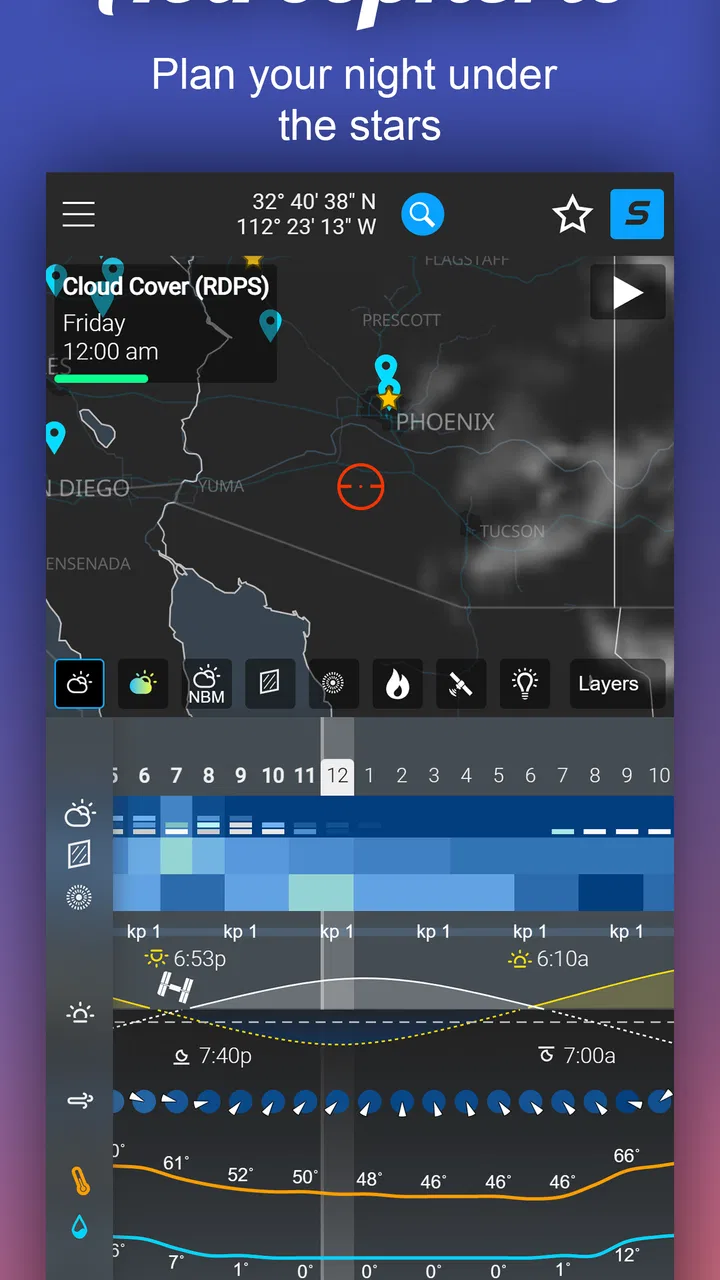
Astrospheric is an astronomy weather and planning app designed for stargazers, astrophotographers, and amateur astronomers. It combines forecasts for cloud cover, seeing, transparency, smoke, wind, temperature, and darkness conditions in one place. After selecting a location, users can quickly evaluate whether the upcoming night is suitable for observing planets, deep-sky objects, meteor showers, or photographing the Milky Way.
02How accurate are Astrospheric’s astronomy forecasts?
Astrospheric provides specialized forecasts rather than relying only on a standard daily weather report, but no forecast can guarantee perfect observing conditions. Cloud layers, atmospheric turbulence, smoke, and local weather can change unexpectedly. The app is most useful for comparing several forecast indicators and checking conditions repeatedly as an observing session approaches, especially when planning an important astrophotography trip or long imaging session.
03Does Astrospheric show more than cloud cover?
Yes. One of Astrospheric’s main advantages is that it presents several factors that affect the quality of an astronomy session. Depending on the selected location and available forecast data, you can review cloud cover, transparency, seeing, smoke, wind, humidity, temperature, and other relevant conditions. This broader information helps users distinguish between a clear night that is good for visual observing and one that is better suited to astrophotography.
04Can I use Astrospheric for astrophotography planning?
Astrospheric can be very helpful for astrophotographers who need to choose suitable nights and locations. Its forecast information helps you identify periods with low cloud cover, better transparency, calmer winds, and improved seeing. It should be used as a planning aid rather than a replacement for equipment preparation or local checks. Battery levels, dew protection, moon conditions, and your camera setup still require separate attention.
05Is Astrospheric free to download and available on Android or iPhone?
Availability, pricing, and included features can vary depending on the platform and the version offered in the official app store. Before downloading, check the current listing for your Android or iOS device to confirm compatibility, subscription details, and whether advanced forecast tools require payment. Users should also verify that location services and internet access are available, since accurate forecasts depend on the selected observing location and updated data.
Pros
- Detailed seeing
- transparency
- cloud
- and smoke forecasts for stargazing.
- Interactive maps help identify dark-sky areas and nearby observing locations.
- Supports planning sessions with weather forecasts tailored to astronomy.
- Useful alerts can notify you when observing conditions are likely to improve.
- Includes astronomical data valuable to both beginners and experienced observers.
Cons
- Some advanced forecasts and features may require a paid subscription.
- Forecast accuracy depends heavily on available local weather data.
- The interface can feel dense and technical for first-time users.
- Frequent data updates may consume noticeable mobile data and battery.
- Best results require location access
- which some privacy-conscious users may avoid.

Astrospheric
Gallery